Twine and Interactive Storytelling
Twine is an open-source tool for telling interactive, nonlinear stories. It allows you to create text-based games and narratives that can branch based on user choices.
Here is a little video to get you started.
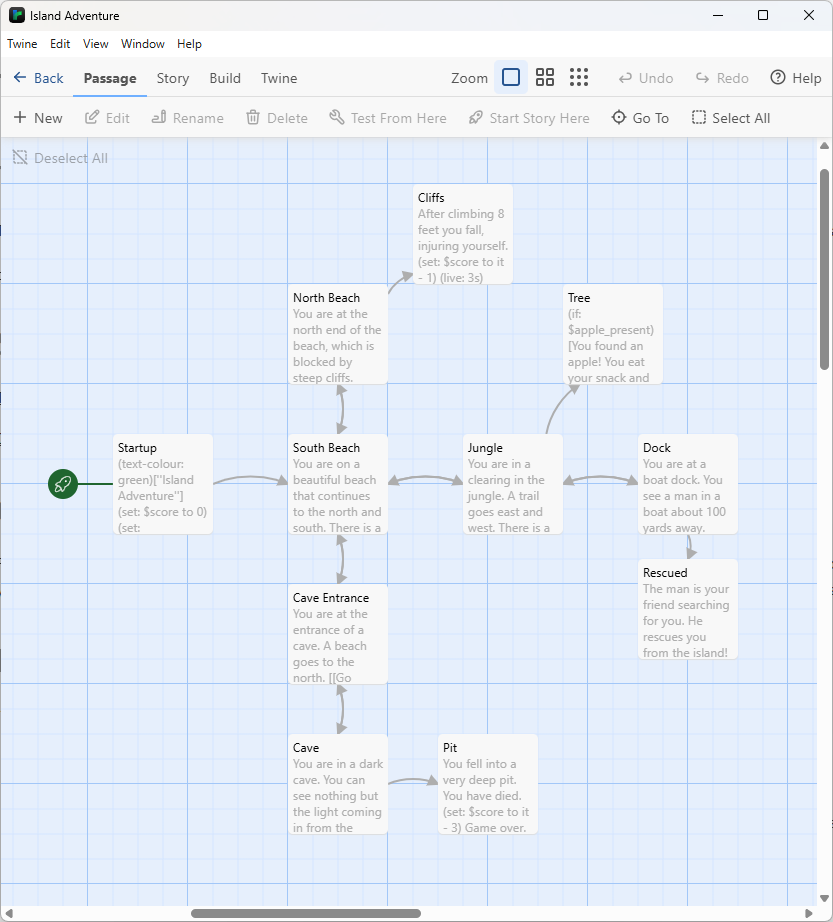
This is the Twine story I made based on the old Python Adventure I used to share with my students. The Twine map for it is below. Click it to enlarge.
For today's assignment, start work on an making an interactive story using Twine. This is an opportunity for you to try out some ideas and learn how to use the basic features of Twine. In our next class, I will teach you some more advanced features. I want you to spend the rest of class working on your story. If you think you are finished with your story, try to add more passages and branching paths.
Twine automatically saves your work in your Library. If you want to put your work on OneDrive, you have two options.
You can load individual stories or entire archives using the "Import" button in the Library tab.
If you want to learn more about Twine, here are some helpful resources: